Virtual Labs
IIT Kharagpur
Simulation
Instructions
Enter the values of the Mechanical system parameters. Note: Default values are already given.
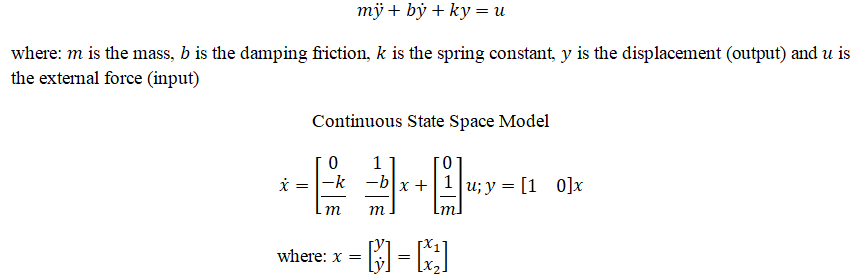
Click on 'State Space Model' button to get the continuous state space form of the system.
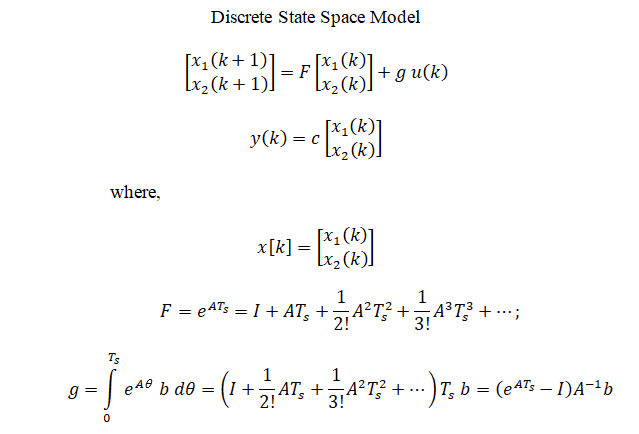
Click on ' Discrete State Space Model' button to get the discrete state space form.
Click on 'Check for Controllabilty' button to get check the controllability of the system.
Click on the 'Rank' or 'Determinant' or "Inference' buttons to get the the Controllability test information.
Clicking on 'Type of the Design' dropdown-menu to select the design.
Click on the 'Run' button to run the selected design.
Enter the desired initial value and click on the 'Closed Loop Response' button to generate the plot.
Click on ' Enter the Pole Location' button to enter the desired pole values (in s domain) for state feedback method.
Click on ' Desing' button to get the gain values for the state feedback method.
Enter the desired initial value and click on the 'Closed Loop Response' button to generate the plot.
Click on 'Download' button to download the plot.
Run both methods without using the 'Clear' button, and then click the 'Compare Closed Loop Response' button to compare the plot.
Click on 'Clear' button to enter the new values of quantities.
Enter the values of the following quantities:
Mass :
m
=
Damping friction :
b
=
Spring constant :
k
=
Sampling Time (sec) :
T
s
=
State Space Model
State Space Model of the Mechanical System
Discrete State Space Model
Discrete State Space Model of the Mechanical System
Check for Controllability
Controllability Test
$$ Q_c = [g_a, \ F_ag_a] $$
Rank of
Q
c
Determinant of
Q
c
Inference
Type of the Design
Deadbeat control
State Feedback Control
Run
Clear
Deadbeat Control Design
Simulation: Deadbeat Control
Enter the initial conditions Displacement (m):
Closed Loop Response
State Feedback Control Design
Enter the Pole Location
Enter the desired negative pole values (in s domain) for State Feedback Control:
Pole 1 : P1 =
Pole 2 : P2 =
Design
Simulation: State Feedback Control
Enter the initial conditions Displacement (m):
Closed Loop Response
Compare Closed Loop Response
Download Plot